Deploy to PAAS
Platform as a Service - PAAS - is one way to deploy web apps.
After reading it you should
- know different cloud service models
- know some of the 12 factors of the 12factor App
- be able to deploy to dokku
- be able to deploy to heroku (warning: you need a credit card and have to pay)
Slides - use arrow keys to navigate, esc to return to page view, f for fullscreen
1 What is Cloud Computing?
When you want to publish your web application you can use your own computer, connect it to the internet permanently, and do all the work of maintaining the computer and the internet connection yourself.
Or you can use a service provider that takes care of part of the job. Depending on how much you do yourself these services have different names.
This diagram from redhat shows four different scenarios:
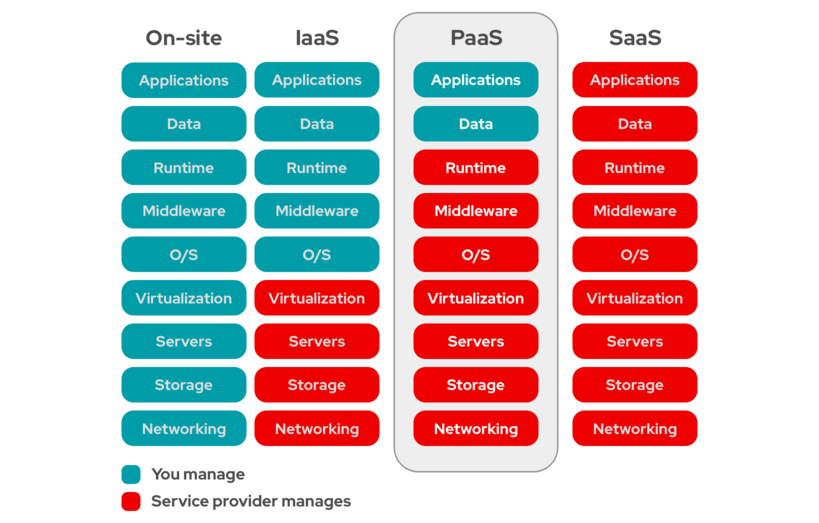
- On-site, also called on premise, means running your own hardware in your own room with your own internet connection.
The following three scenarios all fall under the term "Cloud Computing":
With Infrastructure as a Service the server is housed in a server room at the service provider. Hardware, internet connecion, power are all taken care of. You rent a virtual machine, sometimes with operating system preinstalled, and take care of everything form the operating system upwards.
Platform as a Service also takes care of the operating system (e.g. Linux), running databases and other services and providing the interpreter or runtime for the programming language. You rent space for your app plus the database(es) you need.
With Software as a Service there is no app to deploy, the whole stack is in the hands of the service provider.
For a company, moving from on premise to *aas means employing fewer sysadmins and buying less hardware. It also means paying a lot of money to the service provider.
Which alternative is feasibly and which one is cheaper for a specific project depends on many factors.
2 Why use Cloud Computing?
The NIST Definition of Cloud Computing lists five essential characteristics of cloud computing. The short version is:
- On-demand self-service. A consumer can configure computing capabilities (storage, cpus,...) as needed, without human interaction with each service provider.
- Broad network access. Capabilities are available over the network and accessed through standard mechanisms.
- Resource pooling. The provider’s computing resources serve multiple consumers. Different physical and virtual resources are dynamically assigned and reassigned according to demand.
- Rapid elasticity. Capabilities can be elastically provisioned and released. To the consumer, the capabilities available for provisioning appear to be unlimited.
- Measured service. Resource usage can be monitored, controlled, and reported, providing transparency for both the provider and consumer of the utilized service.
3 Public vs. Private Cloud
Any cloud infrastructure that is open for use by the general public is called a public cloud. Public does not mean free, just that any paying customer can use it. It exists on the premises of the cloud provider.
A private cloud would be iaas, paas, or saas that is run for the exclusive use of one organisation. To be called "cloud" it should still exhibit the five characteristics above.
In this guide we will look at one example of a public paas (heroku) und one example of a private paas (dokku).
4 Using Heroku
you need to
- create an account on heroku
- give them your credit card number, this will cost money!
- and install the heroku command line interface (cli)
- add your public key to heroku by running
heroku keys:add
5 Using Dokku with ssh
if you are reading this as part of your course at Fachhochschule Salzburg you already have an account on our local dokku install.
If you have your own linux VM that can work as a server, you can install dokku on it, it is open source.
To send commands to dokku you can use ssh. For example:
ssh -p PORT dokku@HOSTNAME config appname # will output the evironment variables
ssh -p PORT dokku@HOSTNAME logs appname   # will output the last part of the logfile
ssh -p PORT dokku@HOSTNAME run --force-tty appname bin/rails console  # interactive rails console
6 Using Dokku with the client
To install the dokku client on your development machine: if it's a mac:
brew install dokku/repo/dokku
If it's ubuntu:
git clone https://github.com/dokku/dokku.git ~/.dokku
# Add this line to ~/.bashrc or ~/.zshrc
echo "alias dokku='bash \$HOME/.dokku/contrib/dokku_client.sh'" >> ~/.bashrc
7 The 12factor App
In 2011 the document "the 12factor app" was published by developers by the company heroku. It describes how to prepare a web app for running on a paas.
Many of these 12 factors have become commonplace for web development - you probably have been doing some of it all along. But let's look at each one in turn. A link to the original document is always provided in the first sentence, please read the original first!
7.1 I. Codebase
One codebase tracked in revision control, many deploys
Today, git is used for all new projects.
"Multiple apps sharing the same code" is explicitly discouraged for a 12 factor app. Here there is no industry consensus. Some companys use one app per repo, some others use Monorepos that contain many different apps and libraries, most famously Google. (If you have as much code as google git will not suffice for a monorepo)
7.2 II. Dependencies
Explicitly declare and isolate dependencies
Dependency declaration through a file like Gemfile, package.json, composer.json
is available in all modern languages for the web.
7.3 III. Config
Store config in the environment
You can see the environment variables in both dokku and heroku by
running the config command:
$ dokku config
=====> joe19 env vars
DATABASE_URL:          postgres://postgres:a051e0ff74c1@dokku-postgres-jobboarddemo-db:5432/jobboarddemo_db
DOKKU_APP_RESTORE:     1
DOKKU_APP_TYPE:        dockerfile
DOKKU_PROXY_PORT:      80
DOKKU_PROXY_SSL_PORT:  443
GIT_REV:               9d6a962ec7cf0070a395f1f58cf10dc6e65afed3
RAILS_MASTER_KEY:      cf22a74f420883ef254e3a7c023966eb
REDIS_URL:             redis://:feb28989602d9b296c812da56@dokku-redis-jobboarddemo-redis:6379
or for another app:
$ heroku config
=== obscure-springs-61542 Config Vars
DATABASE_URL:             postgres://erout:1baa7f8@ec2-34-200-106-49.compute-1.amazonaws.com:5432/d3jjlc4
LANG:                     en_US.UTF-8
RACK_ENV:                 production
RAILS_ENV:                production
RAILS_LOG_TO_STDOUT:      enabled
RAILS_SERVE_STATIC_FILES: enabled
SECRET_KEY_BASE:          39a9fdb1549bfc2042b1d227682d3a2a5eebd26377461a479c727f6f0ef
7.4 IV. Backing services
Treat backing services as attached resources
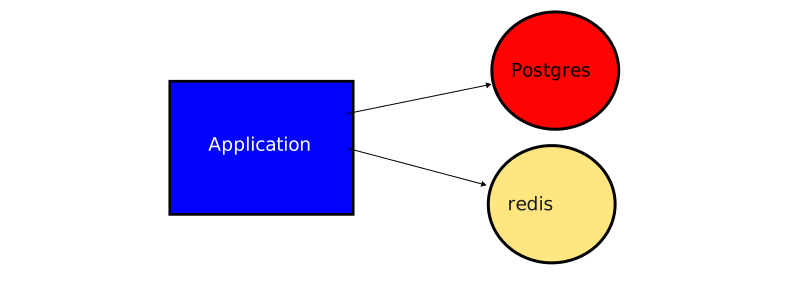
If you look back at the environment variables above
you can see the variable DATABASE_URL. This contains
all the information needed to connect to the database -
type of database, username, password, host, port, name of the database.
DATABASE_URL: postgres://erout:1baa7f8@ec2-34-200-106-49.compute-1.amazonaws.com:5432/d3jjlc4
Here you can also see that Heroku uses Amazon AWS to run the database server. To Heroku buys iaas from aws and sells paas to us.
7.5 V. Build, release, run
Strictly separate build and run stages
Here we first meet a limitation of the 12 factor app when we compare it to deploying PHP via SFTP: It is impossible to make changes to the code at runtime.
If you change the code, you need to commit, push to the paas, where the app it will be built. It will take a minute for the new version of the app to be deployed.
7.6 VI. Processes
Execute the app as one or more stateless processes
In the beginning, your app will run as one process.
7.7 VII. Port binding
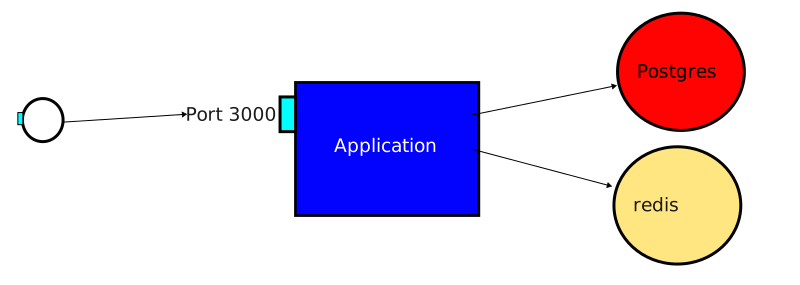
Export services via port binding
Each app offers a HTTP server to the outside world. You will need to declare the port your HTTP server is running on. For example for Ruby on Rails this is typically port 3000.
7.8 VIII. Concurrency
Scale out via the process model
In the beginning, your app will run as one process. Later on you might need to scale up and run 2, 3, 4 processes in parallel. The PAAS will take care of routing different requests to different processes of your app.
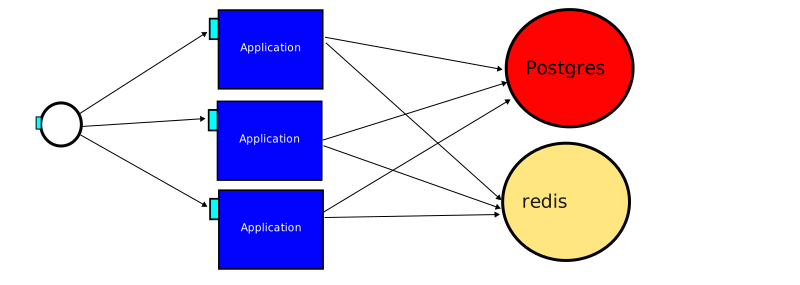
The app itself needs to be stateless.
7.9 IX. Disposability
Maximize robustness with fast startup and graceful shutdown
Each app process is disposable - it can be shut down quickly, and nothing is lost. Data is only stored permanently in backing services like a database, or in a storage service or volume.
7.10 X. Dev/prod parity
Keep development, staging, and production as similar as possible
Yes.
7.11 XI. Logs
You can see the log in both dokku and heroku by
running the logs command:
$ dokku logs
2025-11-24T20:30:46.315963919Z app[web.1]: [816d2f43-c4c0-4521-89a0-ffc2f243596f] Started GET "/jobs/2" for 194.166.209.208 at 2025-11-24 20:30:46 +0000
2025-11-24T20:30:46.318252143Z app[web.1]: [816d2f43-c4c0-4521-89a0-ffc2f243596f] Processing by JobsController#show as HTML
2025-11-24T20:30:46.318290592Z app[web.1]: [816d2f43-c4c0-4521-89a0-ffc2f243596f]   Parameters: {"id" => "2"}
2025-11-24T20:30:46.487038122Z app[web.1]: [816d2f43-c4c0-4521-89a0-ffc2f243596f]   Rendered layout layouts/application.html.erb (Duration: 34.1ms | GC: 0.1ms)
2025-11-24T20:30:46.487290093Z app[web.1]: [816d2f43-c4c0-4521-89a0-ffc2f243596f] Completed 200 OK in 169ms (Views: 35.3ms | ActiveRecord: 99.4ms (2 queries, 0 cached) | GC: 0.5ms)
2025-11-24T20:30:46.490611938Z app[web.1]: {"time":"2025-11-24T20:30:46.490419862Z","level":"INFO","msg":"Request","path":"/jobs/2","status":200,"dur":187,"method":"GET","req_content_length":0,"req_content_type":"","resp_content_length":2270,"resp_content_type":"text/html; charset=utf-8","remote_addr":"194.166.209.208","user_agent":"Mozilla/5.0 (Macintosh; Intel Mac OS X 10.15; rv:146.0) Gecko/20100101 Firefox/146.0","cache":"miss","query":"","proto":"HTTP/1.1"}
2025-11-24T20:30:46.589852933Z app[web.1]: {"time":"2025-11-24T20:30:46.589414199Z","level":"INFO","msg":"Unable to proxy request","path":"/assets/application-bfcdf840.js","error":"context canceled"}
2025-11-24T20:30:46.589891496Z app[web.1]: {"time":"2025-11-24T20:30:46.58952369Z","level":"INFO","msg":"Request","path":"/assets/style-d769b782.css","status":200,"dur":5,"method":"GET","req_content_length":0,"req_content_type":"","resp_content_length":690,"resp_content_type":"text/css","remote_addr":"194.166.209.208","user_agent":"Mozilla/5.0 (Macintosh; Intel Mac OS X 10.15; rv:146.0) Gecko/20100101 Firefox/146.0","cache":"miss","query":"","proto":"HTTP/1.1"}
2025-11-24T20:30:46.589903889Z app[web.1]: {"time":"2025-11-24T20:30:46.589438843Z","level":"INFO","msg":"Unable to proxy request","path":"/assets/stimulus.min-4b1e420e.js","error":"context canceled"}
or for another app:
$ heroku logs
2020-11-17T23:07:37.373849+00:00 heroku[router]: at=info method=GET path="/stylesheets/application.css" host=obscure-springs-61542.herokuapp.com request_id=d3e9ae87-bf4f-4c7e-b640-9663a184b8b5 fwd="193.171.53.146" dyno=web.1 connect=0ms service=3ms status=404 bytes=1902 protocol=https
2020-11-17T23:07:39.869495+00:00 app[web.1]: I, [2020-11-17T23:07:39.869410 #4]  INFO -- : [11aade3c-23be-4927-a1fb-73432521b203] Started GET "/drinks" for 193.171.53.146 at 2020-11-17 23:07:39 +0000
2020-11-17T23:07:39.870216+00:00 app[web.1]: I, [2020-11-17T23:07:39.870132 #4]  INFO -- : [11aade3c-23be-4927-a1fb-73432521b203] Processing by DrinksController#index as HTML
2020-11-17T23:07:39.871120+00:00 app[web.1]: I, [2020-11-17T23:07:39.871051 #4]  INFO -- : [11aade3c-23be-4927-a1fb-73432521b203]   Rendering drinks/index.html.erb within layouts/application
2020-11-17T23:07:39.873153+00:00 app[web.1]: D, [2020-11-17T23:07:39.873081 #4] DEBUG -- : [11aade3c-23be-4927-a1fb-73432521b203]   Drink Load (0.8ms)  SELECT "drinks".* FROM "drinks"
2020-11-17T23:07:39.873890+00:00 app[web.1]: I, [2020-11-17T23:07:39.873815 #4]  INFO -- : [11aade3c-23be-4927-a1fb-73432521b203]   Rendered drinks/index.html.erb within layouts/application (Duration: 2.6ms | Allocations: 288)
2020-11-17T23:07:39.874513+00:00 app[web.1]: I, [2020-11-17T23:07:39.874442 #4]  INFO -- : [11aade3c-23be-4927-a1fb-73432521b203] Completed 200 OK in 4ms (Views: 2.8ms | ActiveRecord: 0.8ms | Allocations: 885)
2020-11-17T23:07:39.875779+00:00 heroku[router]: at=info method=GET path="/drinks" host=obscure-springs-61542.herokuapp.com request_id=11aade3c-23be-4927-a1fb-73432521b203 fwd="193.171.53.146" dyno=web.1 connect=0ms service=7ms status=200 bytes=1937 protocol=https
7.12 XII. Admin processes
Run admin/management tasks as one-off processes
You can run other processes in both dokku and heroku by
using the run command:
dokku run rails db:migrate
heroku run rails db:migrate
8 First steps with dokku
To deploy a Ruby on Rails app to dokku you need to:
- on the server: create an app on dokku, plus postgres as the backing service
- on your development machine: add a new
git remote. you have been usingorigin, the remote for dokku is calleddokku - make sure in
config/database.ymlthe link to the production database is set correctly - set the environment variable for the master.key
- commit
- push the main branch to dokku using git
- run
rails db:migrate, and mayberails db:seedon the paas
8.1 Step 1: Create an app and a backing service
This is done on the dokku server on the commandline. Here an example for an app called jobpichu:
dokku apps:create jobpichu
dokku domains:set jobpichu jobpichu.projects.ct.fh-salzburg.ac.at
dokku postgres:create jobpichu-db
dokku postgres:link jobpichu-db jobpichu
dokku storage:ensure-directory jobpichu
dokku storage:mount jobpichu /var/lib/dokku/data/storage/jobpichu:/app/storage
dokku nginx:set jobpichu client-max-body-size 5m
dokku proxy:build-config jobpichu
dokku letsencrypt:enable jobpichu
echo '========= now you should deploy to ssh://dokku@projects.ct.fh-salzburg.ac.at:5412/jobpichu =========='
echo '========== your app will be available as https://jobpichu.projects.ct.fh-salzburg.at =========='
8.2 Step 2: Add a new remote
A Git remote is essentially a link to another copy of your Git repository, usually hosted on a server somewhere on the internet.
You have used a remote called origin before - it is set up every time you clone a repository, for example from github.com.
Every time you push you specify which remote to push to:
# git push <remote> <branch>
git push origin main
This pushes the local branch main to the remote origin, and the branch main there.
To deploy to dokku, you also use git push. But first you have to tell git the address of the repository to push to.
For example if your address is ssh://dokku@projects.ct.fh-salzburg.ac.at:5412/jobpichu you should configure it like this:
git remote add dokku ssh://dokku@projects.ct.fh-salzburg.ac.at:5412/jobpichu
If this works, you can push to dokku (later)
git push dokku main
8.3 Step 3. Check the database configuration
Have a look at the file config/database.yml. There you will find the configuration of the database for the three
different environments: development, test and production. The entry for production should look like this:
production:
  url: <%= ENV["DATABASE_URL"] %>
Make sure to get the indentation right! The file format is yaml (yet another markup language). It does not use parenthesis or curly brackets to define the structure, only indentation.
In a terminal inside your project folder run the command
dokku config
You should see an entry like
DATABASE_URL: postgres://postgres:a051e0ff74c1@dokku-postgres-jobpichu-db:5432/jobpichu_db
This information will be used to connect to the database. It looks like a URL and can be parsed like one:
- it is a postgres database
- the username is postgres
- the password is a051e0ff74c1
- the hostname to connect to is dokku-postgres-jobpichu-db
- the port number is 5432
- the database to connect to is named jobpichu_db
8.4 Step 4: set the environment variable for the master.key
Rails let's you stores secrets (like API keys) in an encrypted file. Actually it has already created that encrypted file, and added it to git.
- the encrypted file
config/credentials.yml.encwas added to git - the key for decryption was stored in
config/master.keyand not added to git, but to .gitignore
You could edit the encrypted file like this:
VISUAL="code --wait" bin/rails credentials:edit
On your local machine config/master.key is used. On dokku, this information needs to be stored in an environment variable.
This is how you set the variable:
dokku config:set --no-restart RAILS_MASTER_KEY=**********************
8.5 Step 5: commit
Check if you have changes in your local code base (with git status). If there are any, make sure
to commit. Only committed code will be deployed!
8.6 Step 6: push the main branch to dokku using git
git push dokku main
You will see a lot of output: you can watch how the app is being built. At the end of the process you hopefully see:
=====> Application deployed:
       http://jobpichu.projects.ct.fh-salzburg.ac.at
       https://jobpichu.projects.ct.fh-salzburg.ac.at
8.7 Step 7: Migrations and Seeds
Now your app is deployed, it has a connection to a database, but the database is empty.
If you had this situation on your local machine, you would run
rails db:migrate
You can also do this on the dokku server, inside the deployed app, by adding dokku run before the command:
dokku run rails db:migrate
8.8 Problems?
Are there still problems with your app? Have a look at the log files by running
dokku logs
9 Using dokku
Take a minute to look back at all the steps:
- which steps will be necessary when you want to deploy a new version of your app?
- which steps will be necessary if a new team member wants to set up the development environment on their own machine?
10 Using dokku for other types of apps
Dokku is not connected to Ruby on Rails. You can also deploy php, node.js, python projects, or anything that can be built and run with a Dockerfile